Wazuh integration
Follow the following steps to ship the system log events to your Wazuh instance.
change ossec.conf
macOS
If you haven’t already done so, install the Citadel agent that Citadel needs to communicate the events outside browser sandbox.
In the ossec.conf file that is deployed on agents, edit the existing <localfile> entry to ensure that the syslog events are seen by Wazuh, by adding to the query: or (process == "citadel-browser-agent" and message beginsWith "browser agent : ")
  <localfile>
    <location>macos</location>
    <log_format>macos</log_format>
    <query type="trace,log,activity" level="info">(process == "sudo") or (process == "sessionlogoutd" and message contains "logout is complete.") or (process == "sshd") or (process == "tccd" and message contains "Update Access Record") or (message contains "SessionAgentNotificationCenter") or (process == "screensharingd" and message contains "Authentication") or (process == "securityd" and eventMessage contains "Session" and subsystem == "com.apple.securityd") or (process == "citadel-browser-agent" and message beginsWith "browser agent : ")</query>
  </localfile>
Note If you change the log level be sure to update the
config.logging.shipLevelconfiguration, to ensure that the Event Dashboard shows the correct events. For more information see logging configuration.
Windows
If you haven’t already done so, install the Citadel agent that Citadel needs to communicate the events outside browser sandbox.
In the ossec.conf file that is deployed on agents, add the following <localfile> entry to ensure that the syslog events are seen by Wazuh.
  <!-- Browser Agent -->
  <localfile>
    <log_format>syslog</log_format>
    <location>C:\Program Files\Citadel\logs\CitadelSvc.out.log</location>
    <ignore>, "level": "(DEBUG|TRACE)", </ignore>
  </localfile>
Note If you change the log level be sure to update the
config.logging.shipLevelconfiguration, to ensure that the Event Dashboard shows the correct events. For more information see logging configuration.
add index template
When the OpenSearch database in Wazuh encounters a new field, it creates the field as “keyword”, instead of as “date” or “integer”. This prevents them from being used in aggregations functions in dashboards. In order to ensure that the fields are created with the correct types, they have to be defined in the index template. Wazuh has a default template that takes care of the standard Wazuh fields, and a second template has to be added that will be merged with the default Wazuh one.
Go to Indexer management > Dev Tools and call the OpenSearch API with this snippet:
PUT _template/wazuh-browseragent
{
  "index_patterns": ["wazuh-alerts-*"],
  "order": 50,
  "mappings": {
    "properties": {
      "data": {
        "properties": {
          "browseragent": {
            "properties": {
              "detail": {
                "properties": {
                  "download": {
                    "properties": {
                      "bytesReceived": { "type": "long" },
                      "fileSize":      { "type": "long" },
                      "totalBytes":    { "type": "long" },
                      "startTime":     { "type": "date" },
                      "endTime":       { "type": "date" }
                    }
                  },
                  "file_select": {
                    "properties": {
                      "size":         { "type": "long" },
                      "lastModified": { "type": "date" }
                    }
                  },
                  "extension": {
                    "properties": {
                      "score":      { "type": "long" },
                      "issues":  { "type": "text" }
                    }
                  }
                }
              },
              "numvalue": { "type": "double" }
            }
          }
        }
      }
    }
  }
}
Warning
This template will only be applied when the next index is created, which is generally the next day. If events are injected in the current index, the fields will not be the correct type, and the same field will have different types in different indexes. This may cause strange behaviour elsewhere. You may want to wait with injecting new events until the next index is created, or delete the current index (though this means losing that day’s worth of security events
add decoder
In order for the log entries to be converted to events, a decoder has to be defined. In the Wazuh Server Management > Decoders configuration and create a new decoder file 0590-browser-agent_decoder.xml and fill it with the contents of 0590-browser-agent_decoder.xml.
add rules
Events only generate alerts if they are matched by a rule. In Wazuh Server Management > Rules configuration create a new rules file 0019-browser-agent_rules.xml and fill it with the contents of 0019-browser-agent_rules.xml.
Restart the server for the changes to take effect, for example using the Restart cluster > Server Management > Status menu.
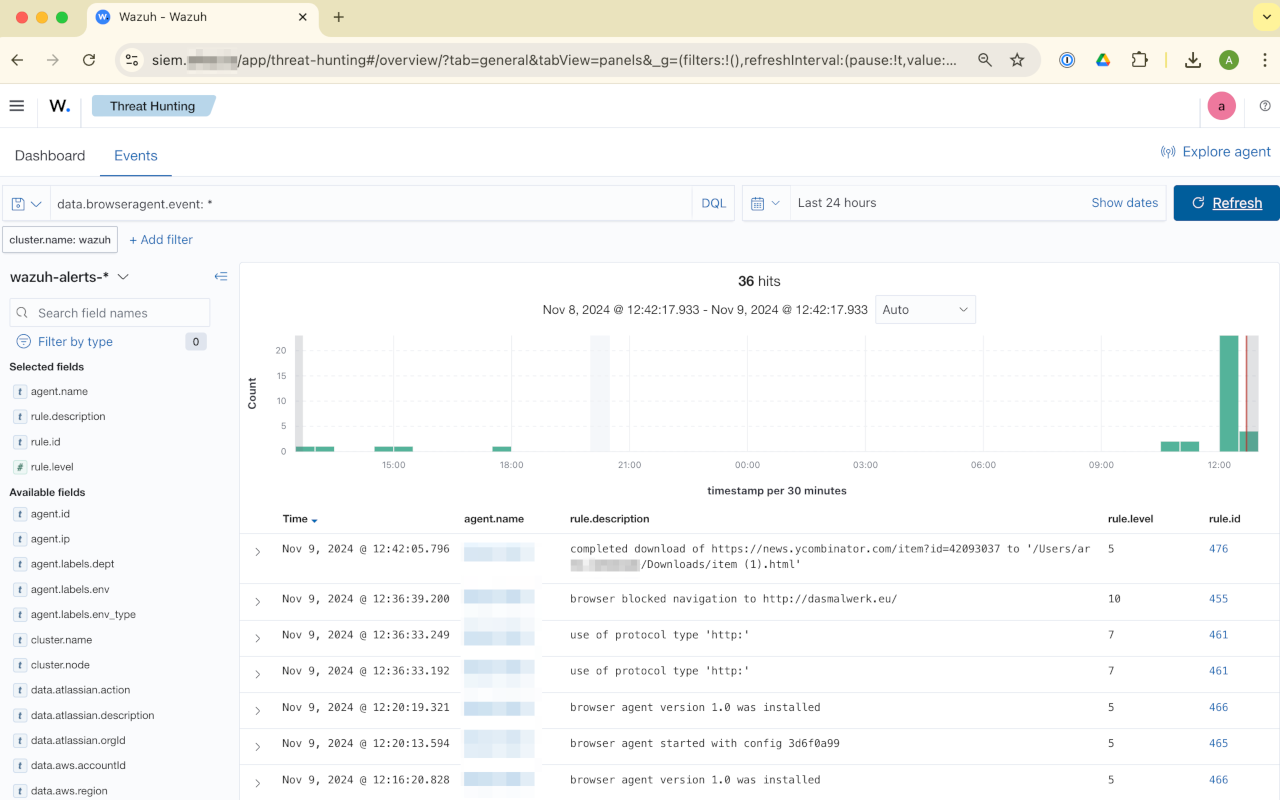
You should start seeing new events show up in the Threat hunting module, for example if you visit http://192.0.2.1 and filter in Wazuh for data.browseragent.event: *.